
Opened 18 years ago
Closed 17 years ago
#3168 closed Bug (duplicate)
Unknown script code appears in the editor
| Reported by: | Prabha | Owned by: | |
|---|---|---|---|
| Priority: | Normal | Milestone: | |
| Component: | General | Version: | FCKeditor 2.6.2 |
| Keywords: | Pending WorksForMe | Cc: | vsprabha@… |
Description
Steps to replicate:
- Have some default content in the form field which uses editor.
- After the page is loaded with the editor, select all the content in the editor and press delete button on the keyboard
- Press delete button once again, script code will appear in the editor.
Example:
- Visit the link http://www.sustainlane.com
- Click on the link 'Post to Sustainlane' which is on the right side of the page below a search box.
- On the next page click on the link Blog
- A radio button selection appears on the right side of the page
- Select 'Recipe' and click on the next button.
- A form with FCKEditor as one of the form fields appears, which has some template text.
- Select this text and press delete button and remove the content.
- Press delete button once again.
- The script appears in the editor.
Note: No signin/registration is required to try the above steps on sustainlane.com.
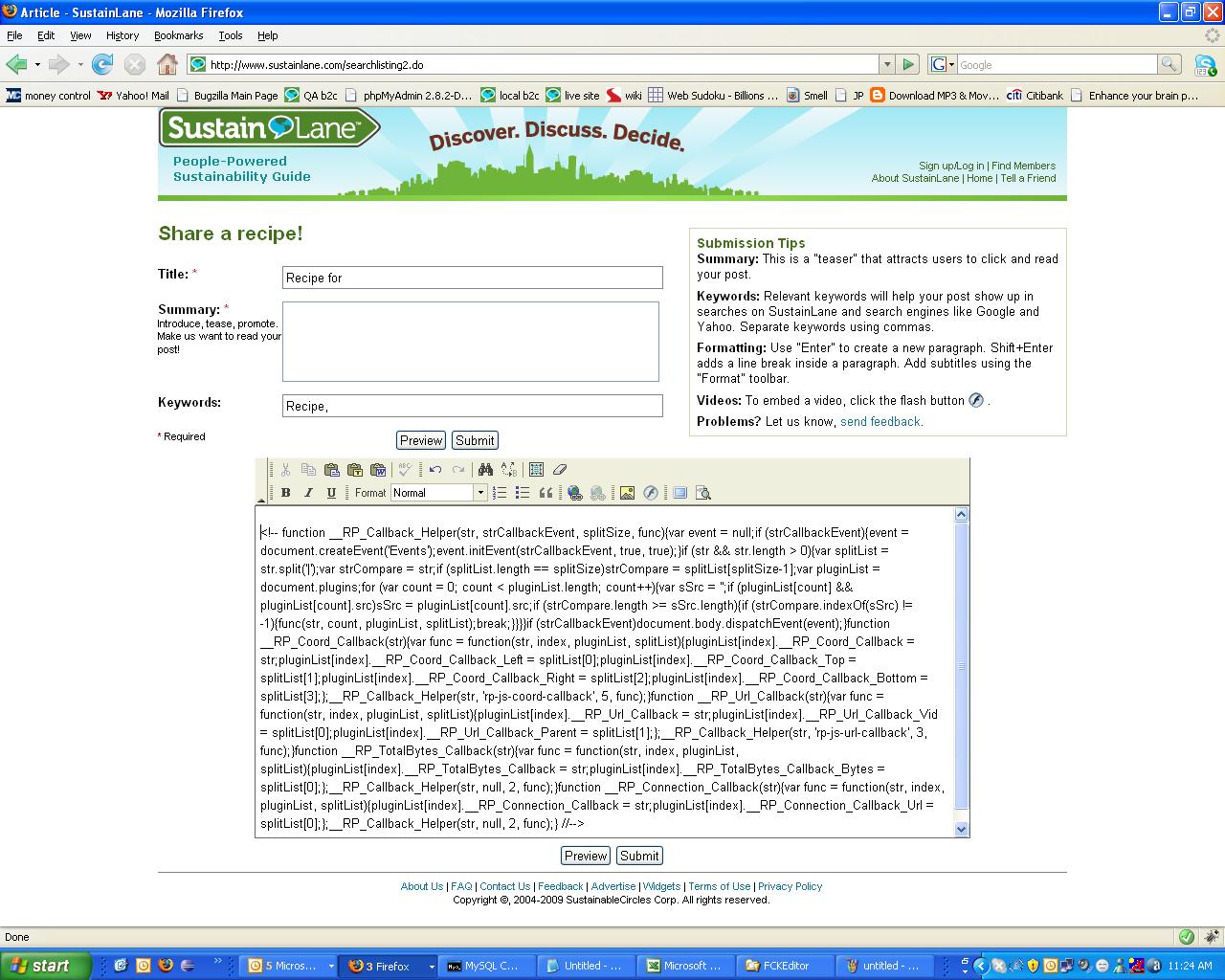
Following is the script code that appears in the editor:
-- function RP_Callback_Helper(str, strCallbackEvent, splitSize, func){var event = null;if (strCallbackEvent){event = document.createEvent('Events');event.initEvent(strCallbackEvent, true, true);}if (str && str.length > 0){var splitList = str.split('|');var strCompare = str;if (splitList.length == splitSize)strCompare = splitList[splitSize-1];var pluginList = document.plugins;for (var count = 0; count < pluginList.length; count++){var sSrc = ;if (pluginList[count] && pluginList[count].src)sSrc = pluginList[count].src;if (strCompare.length >= sSrc.length){if (strCompare.indexOf(sSrc) != -1){func(str, count, pluginList, splitList);break;}}}}if (strCallbackEvent)document.body.dispatchEvent(event);}function RP_Coord_Callback(str){var func = function(str, index, pluginList, splitList){pluginList[index].RP_Coord_Callback = str;pluginList[index].RP_Coord_Callback_Left = splitList[0];pluginList[index].RP_Coord_Callback_Top = splitList[1];pluginList[index].RP_Coord_Callback_Right = splitList[2];pluginList[index].RP_Coord_Callback_Bottom = splitList[3];};RP_Callback_Helper(str, 'rp-js-coord-callback', 5, func);}function RP_Url_Callback(str){var func = function(str, index, pluginList, splitList){pluginList[index].RP_Url_Callback = str;pluginList[index].RP_Url_Callback_Vid = splitList[0];pluginList[index].RP_Url_Callback_Parent = splitList[1];};RP_Callback_Helper(str, 'rp-js-url-callback', 3, func);}function RP_TotalBytes_Callback(str){var func = function(str, index, pluginList, splitList){pluginList[index].RP_TotalBytes_Callback = str;pluginList[index].RP_TotalBytes_Callback_Bytes = splitList[0];};RP_Callback_Helper(str, null, 2, func);}function RP_Connection_Callback(str){var func = function(str, index, pluginList, splitList){pluginList[index].RP_Connection_Callback = str;pluginList[index].RP_Connection_Callback_Url = splitList[0];};RP_Callback_Helper(str, null, 2, func);} -->
Attachments (1)
Change History (9)
Changed 18 years ago by
| Attachment: | FCKEditor Bug.JPG added |
|---|
comment:1 Changed 18 years ago by
| Component: | Project : MediaWiki+FCKeditor → General |
|---|---|
| Resolution: | → invalid |
| Status: | new → closed |
Setting as invalid, because it's not a bug in the FCKeditor extension for MediaWiki.
For support check the following links:
comment:2 Changed 18 years ago by
| Resolution: | invalid |
|---|---|
| Status: | closed → reopened |
This bug is reproduced on the demo editor [nightly build]
http://www.fckeditor.net/nightly/fckeditor/_samples/default.html
This happens only in FireFox [on Windows], version 2.0.0.11. Might be there in other versions also.
comment:3 Changed 17 years ago by
| Keywords: | Pending WorksForMe added |
|---|
I'm unable to reproduce the problem with Firefox 2.0.20 on windows.
Can you try running Firefox in safe mode?
comment:4 Changed 17 years ago by
| Resolution: | → expired |
|---|---|
| Status: | reopened → closed |
comment:5 Changed 17 years ago by
| Cc: | vsprabha@… added |
|---|---|
| Resolution: | expired |
| Status: | closed → reopened |
The bug still exists on Firefox 2.0.0.20 on Windows XP and I am able to reproduce it with the steps mentioned in the bug description.
comment:6 Changed 17 years ago by
| Resolution: | → duplicate |
|---|---|
| Status: | reopened → closed |
But you haven't tried to reproduce in in Safe Mode.
This is a bug in the Real Player plugin. BTW, Firefox 2.x is no longer supported by Mozilla itself, you should upgrade to 3.0 or 3.5 if you care about your security.
dup of #2242
comment:7 Changed 17 years ago by
| Resolution: | duplicate |
|---|---|
| Status: | closed → reopened |
The behavior is not consistent on all machine with the same browser version. Also exists similar way (few machines show up the bug and few don't) in Fire fox 3.0.12.
comment:8 Changed 17 years ago by
| Resolution: | → duplicate |
|---|---|
| Status: | reopened → closed |
yes, it just depends on the fact that the real player plugin is installed or not. No surprise.
Why don't you try to disable it to verify that it is the problem?


Screen shot