
Opened 17 years ago
Closed 16 years ago
#4476 closed Bug (fixed)
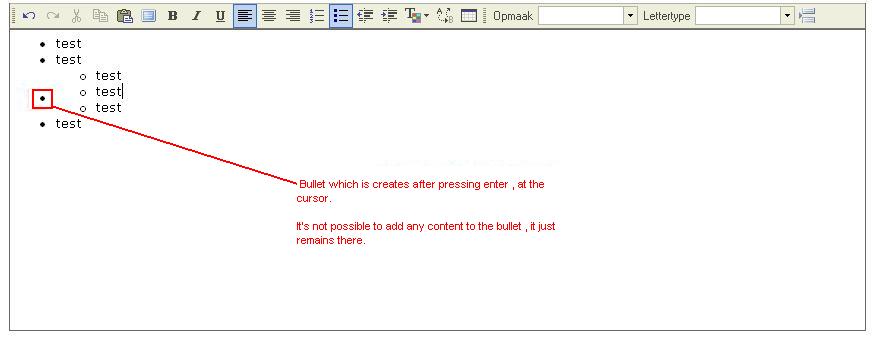
inaccessible bullet created when adding bullet at higher level and pressing enter twice
| Reported by: | Kenny | Owned by: | Garry Yao |
|---|---|---|---|
| Priority: | Normal | Milestone: | CKEditor 3.3 |
| Component: | General | Version: | FCKeditor 2.6.4 |
| Keywords: | Confirmed IE Review+ | Cc: |
Description (last modified by )
We noticed a problem in fckeditor 2.6.4.1 , when creating bullets with multiple levels , and then trying to add a bullet in the middle :
If we have bullets on a higher level , and press enter twice on a bullet on that level , it creates a bullet on a lower level , which cannot be accessed.
Steps to reproduce :
- create 3 bullets with some text , on the same level
- go to the second bullet , press enter , to add a bullet in the middle
- on new bullet , press indent , to make it raise a level
- type some text and create 3 bullets at that level
- go to the second bullet at that level and press enter, which creates a bullet in the middle there
- press enter again, on that new bullet
If you do that , it will create a bullet at a higher level , but you can't type anything at this , and you can only remove it by removing everything around the bullet.
Attachments (2)
Change History (9)
Changed 17 years ago by
| Attachment: | fckeditor_inacessible_bullet.JPG added |
|---|
comment:2 Changed 17 years ago by
| Keywords: | fckeditor 2.6.4 bullets level strange bullet removed |
|---|
comment:3 Changed 17 years ago by
| Keywords: | Confirmed IE added |
|---|---|
| Milestone: | → CKEditor 3.2 |
comment:4 Changed 17 years ago by
| Description: | modified (diff) |
|---|---|
| Milestone: | CKEditor 3.2 → CKEditor 3.3 |
Confirmed with IE8 Compatibility Mode. Work well with IE8 No-Compatibility mode, even if the caret is not positioned properly when hitting ENTER. It should stay in the same bullet when outdenting.
Changed 16 years ago by
| Attachment: | 4476.patch added |
|---|
comment:5 Changed 16 years ago by
| Keywords: | Review? added |
|---|---|
| Owner: | set to Garry Yao |
| Status: | new → assigned |
comment:6 Changed 16 years ago by
| Keywords: | Review+ added; Review? removed |
|---|
When committing, please move the variables declaration from line 272 to the top of the function at line 13. Please format it properly also with the correct number of tabs.


bullet problem