
Opened 17 years ago
Closed 17 years ago
#4980 closed Bug (fixed)
img border=0 not working
| Reported by: | johngoodell | Owned by: | Minh Nguyen |
|---|---|---|---|
| Priority: | Normal | Milestone: | CKEditor 3.2 |
| Component: | General | Version: | 3.1 |
| Keywords: | Confirmed Review+ | Cc: |
Description
Try setting Image Properties -> Border=0, click OK - went back to properties, nothing in border text box.
Then tried linking an image - automatically defaults to a border - went to Image Properties, entered 0 in Border, clicked OK - nothing changes. This WORKS in 3.0, but since installing latest version (last night) it doesn't.
Is OK for any other value entered in this field (tried image border=1 and it saves correctly).
Attachments (3)
Change History (8)
comment:1 Changed 17 years ago by
Changed 17 years ago by
| Attachment: | border_bug.png added |
|---|
comment:2 Changed 17 years ago by
| Keywords: | Confirmed added |
|---|---|
| Milestone: | → CKEditor 3.2 |
Confirmed. Setting border to zero is currently removing the border styles from the image. It should instead set the border style to "none".
Border styles must be removed only when leaving the border field empty.
Changed 17 years ago by
| Attachment: | 4980.patch added |
|---|
This bug also happen with hspace and vspace, too. The reason of problem is we have an error in case logic check variable with zero value.
comment:3 Changed 17 years ago by
| Keywords: | Review? added |
|---|---|
| Owner: | set to Minh Nguyen |
| Status: | new → assigned |
comment:4 Changed 17 years ago by
| Keywords: | Review+ added; Review? removed |
|---|
Changed 17 years ago by
| Attachment: | 4980_2.patch added |
|---|


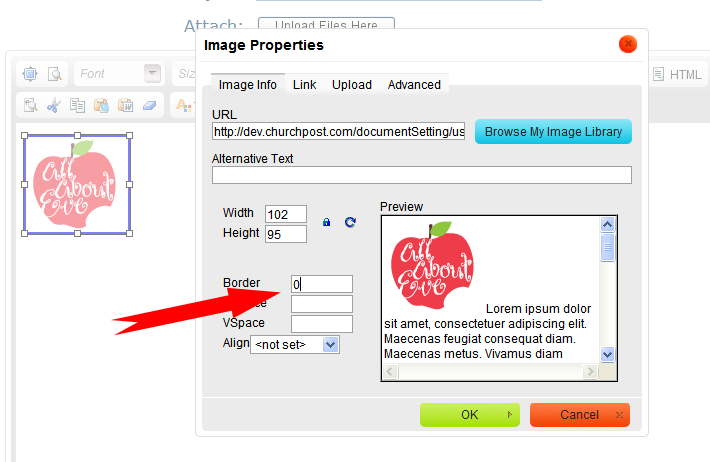
Broken in both FF3 and IE8