
Opened 16 years ago
Closed 16 years ago
#6297 closed Bug (fixed)
Unexpected behavior when toggling bulleted/numbered list with a floating element
| Reported by: | Pablo Vanwoerkom | Owned by: | Garry Yao |
|---|---|---|---|
| Priority: | Normal | Milestone: | CKEditor 3.4.3 |
| Component: | Core : Lists | Version: | 3.4 |
| Keywords: | IBM | Cc: | jamcunni@… |
Description (last modified by )
Enter the following in the ckeditor.
<p>
	paragraph 1 with float left image <img src="http://a.cksource.com/c/1/inc/img/logo-ckfinder.gif" style="float: left;" /></p>
<p>
	paragraph 2</p>
<p>
	paragraph 3</p>
- Select all text and then hit the bulleted/numbered list button. This will move the image into it's own bullet, separated from paragraph
- If you click on a list button again, the image is now in it's own paragraph.
- If you click it again, the image will disappear and its atrributes will get moved to the <li> tag and the bullet will just contain a .
This was tested in Firefox 3.5.
Attachments (4)
Change History (22)
comment:1 Changed 16 years ago by
| Version: | → 3.4 |
|---|
Changed 16 years ago by
| Attachment: | krst_18.09.36.png added |
|---|
comment:2 Changed 16 years ago by
| Component: | General → Core : Lists |
|---|---|
| Description: | modified (diff) |
| Keywords: | Firefox added; bullets float elements numbered list removed |
| Status: | new → confirmed |
comment:4 Changed 16 years ago by
| Cc: | jamcunni@… added |
|---|
comment:5 Changed 16 years ago by
| Keywords: | IBM added |
|---|
comment:6 Changed 16 years ago by
| Owner: | set to Martin |
|---|---|
| Status: | confirmed → assigned |
comment:7 Changed 16 years ago by
| Keywords: | Opera Safari added |
|---|
Changed 16 years ago by
| Attachment: | 6297.patch added |
|---|
comment:8 Changed 16 years ago by
| Status: | assigned → review |
|---|
comment:9 Changed 16 years ago by
| Keywords: | Firefox Opera Safari removed |
|---|---|
| Milestone: | → CKEditor 3.5 |
| Status: | review → review_failed |
We should change element::isBlockBoundary method, as it's also used in other places.
comment:10 Changed 16 years ago by
| Milestone: | CKEditor 3.5 → CKeditor 3.4.3 |
|---|
comment:11 Changed 16 years ago by
| Status: | review_failed → review |
|---|
comment:12 Changed 16 years ago by
| Status: | review → review_failed |
|---|
Well, it looks unreasonable to determinate display mode from elements structure.
Changed 16 years ago by
| Attachment: | 6297_2.patch added |
|---|
comment:13 Changed 16 years ago by
| Status: | review_failed → review |
|---|
comment:14 follow-up: 15 Changed 16 years ago by
| Status: | review → review_failed |
|---|
The problem with an attribute migration is solved by second patch. Although on Webkit there's created a new, empty LI after each list & unlinst operations. When we remove the image from the TC, this behavior is gone, so it may be related.
comment:15 Changed 16 years ago by
| Owner: | changed from Martin to Garry Yao |
|---|---|
| Status: | review_failed → review |
Replying to tobiasz.cudnik:
The problem with an attribute migration is solved by second patch. Although on Webkit there's created a new, empty LI after each list & unlinst operations. When we remove the image from the TC, this behavior is gone, so it may be related.
WFM on webkit with the ticket test, what exactly do you see there?
comment:16 Changed 16 years ago by
- Use the following content with the selection:
[<p>
	paragraph 1 with float left image <img src="http://a.cksource.com/c/1/inc/img/logo-ckfinder.gif" style="float: left;" /></p>
<p>
	paragraph 2</p>
<p>
	paragraph 3</p>]
- Apply the List command.
- Apply the List command.
Expected: Same as in a point 1.
Result:
<p>
	paragraph 1 with float left image</p>
<p>
	<img src="http://a.cksource.com/c/1/inc/img/logo-ckfinder.gif" style="float: left;" /></p>
<p>
	paragraph 2</p>
<p>
	paragraph 3</p>
comment:17 Changed 16 years ago by
| Status: | review → review_passed |
|---|
Ok, it's fine, i had a wrongly patched version.
comment:18 Changed 16 years ago by
| Resolution: | → fixed |
|---|---|
| Status: | review_passed → closed |
Fixed with [6113].


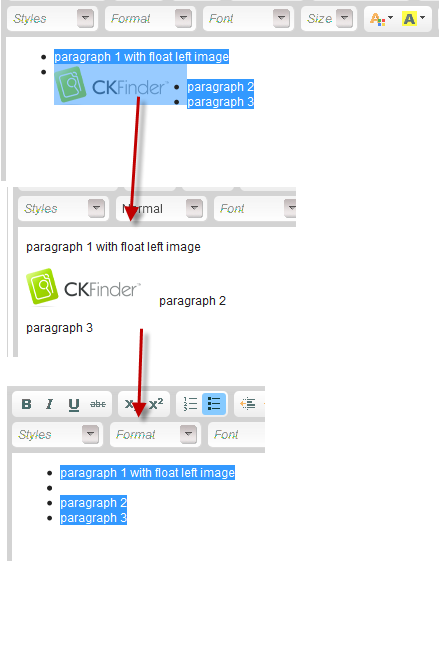
Confirmed in CKE3.4.1, Firefox 3.6.10 result of above operations: