
Opened 15 years ago
Closed 15 years ago
#7283 closed Bug (fixed)
ASP.NET: entered text is not HTML encoded.
| Reported by: | Wiktor Walc | Owned by: | kaga |
|---|---|---|---|
| Priority: | Normal | Milestone: | |
| Component: | Server : ASP.Net | Version: | 3.5.2 |
| Keywords: | Cc: |
Description
Steps to reproduce:
- Open SubmitData.aspx
- Paste the following in source mode:
<p> This is some <tag> in the editor</p>
- Press submit, the result is now:
<p>
	This is some <tag>in the editor</tag></p>
Another way to reproduce it:
- In SampleConfig.aspx set the following:
protected void Page_Load(object sender, EventArgs e) { CKEditor1.Text = "<p>This is some <tag> in the editor</p>"; } - Launch the sample, the result in the editor is:
<p>
	This is some <tag>in the editor</tag></p>
Attachments (6)
Change History (16)
comment:1 Changed 15 years ago by
| Status: | new → confirmed |
|---|---|
| Version: | → 3.5.2 |
comment:2 Changed 15 years ago by
Changed 15 years ago by
| Attachment: | 7283.patch added |
|---|
comment:3 Changed 15 years ago by
| Owner: | set to kaga |
|---|---|
| Status: | confirmed → review |
Changed 15 years ago by
| Attachment: | UpdatePanel.aspx added |
|---|
comment:4 Changed 15 years ago by
| Status: | review → review_failed |
|---|
The attached patch cannot be applied without applying patch for #7285 (otherwise it is impossible to build the dll). Does it really have to depend on the other ticket?
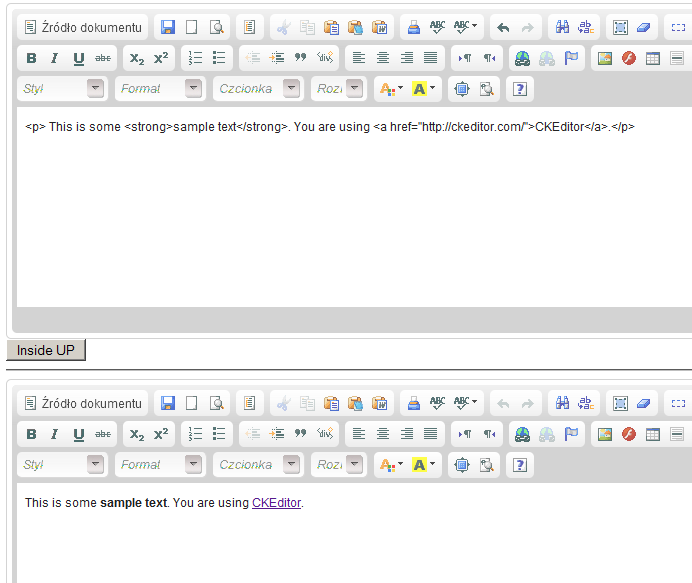
Anyway, when using both patches I found a problem when using the attached sample file (UpdatePanel.aspx) in Firefox.
Steps to reproduce
- Load _Samples/UpdatePanel.aspx
- Press "Inside UP" button
- Press "F5" to refresh the content
- The content of the first editor is now broken (see attached screenshot)
Changed 15 years ago by
| Attachment: | updatepanel_problem.png added |
|---|
Changed 15 years ago by
| Attachment: | 7283_1.patch added |
|---|
comment:5 Changed 15 years ago by
| Status: | review_failed → review |
|---|
This patch resolved also ticket #7285
comment:6 Changed 15 years ago by
| Status: | review → review_failed |
|---|
With the latest patch and I still get the same result as in comment:4
Changed 15 years ago by
| Attachment: | 7283_2.patch added |
|---|
comment:7 Changed 15 years ago by
| Status: | review_failed → review |
|---|
comment:8 Changed 15 years ago by
Another use case to check: http://cksource.com/forums/viewtopic.php?t=21936
I am using ckeditor3.5.2 with asp.net. When I make an update to a page, it displays fine and it saves fine. However, if I push the button to go back to the editor, the text no longer shows itself in wysiwyg mode, but instead is wrapped in html code. If I view the source, it renders all of those extra characters as well. I have to exit the page and get back in for it to show up normally. If I save while in the html code mode, it saves <h1>header</h1><p>stuff here</p> etc to the page. Is there a setting to auto refresh so that it renders correctly when I go back to the editor? Thanks.
comment:9 Changed 15 years ago by
| Status: | review → review_failed |
|---|
Just like in the comment above: IE8, _Samples/SubmitData.aspx, press submit, then press "Back" button. The content in the editor is now broken.
Changed 15 years ago by
| Attachment: | 7283_3.patch added |
|---|
comment:10 Changed 15 years ago by
| Resolution: | → fixed |
|---|---|
| Status: | review_failed → closed |
The last patch has been committed with [6670].


Related forum topics: