
Opened 14 years ago
Closed 12 years ago
#8913 closed Bug (wontfix)
IE9: Problems with full-width sapces.
| Reported by: | Jakub Ś | Owned by: | |
|---|---|---|---|
| Priority: | Normal | Milestone: | |
| Component: | General | Version: | 3.0 |
| Keywords: | IE9 CantFix | Cc: |
Description
What is full-width space:
Source: http://blog.greggman.com/blog/japanese_input_on_windows_xp/
Note: When typing in Hiragana mode pressing the space when there is nothing else typed will insert a full width space. That's usually what you want when typing Japanese but if you need a normal English space you can insert a half-width space while in Hiragana mode by pressing Shift-Space.
To reproduce:
- Set editor language to Japanese -
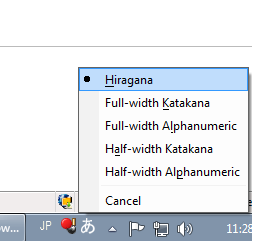
config.language = 'ja'; - Set your input to Japanese and keyboard to Hiragana (see jp.png)
- Load replace by code sample and put cursor at the end of line.
- Perss space and then Enter
- Press space in new line (Cursor will jump up)
- Perss up arrow, and then down arrow
Result: Using arrows you can't move to lines containing full-width spaces.
Please also see jing video showing how to reproduce.
Attachments (3)
Change History (6)
Changed 14 years ago by
Changed 14 years ago by
| Attachment: | 2012-04-20_1111.swf added |
|---|
comment:1 Changed 14 years ago by
| Status: | new → confirmed |
|---|
Changed 12 years ago by
comment:2 Changed 12 years ago by
comment:3 Changed 12 years ago by
| Keywords: | CantFix added |
|---|---|
| Resolution: | → wontfix |
| Status: | confirmed → closed |
I wasn't able to reproduce this issue in HTML5 document but was in HTML 4 document.
I confirm this issue for native contentedtable and HTML4.
Knowing that I'm closing this issue as won't fix.


The error can be confirmed in pure contenteditable element, without using CKEditor.