
Opened 14 years ago
Closed 14 years ago
#9022 closed Bug (fixed)
IE Compat View: Number/Bulle list gets removed when we type the text
| Reported by: | Satya Minnekanti | Owned by: | Garry Yao |
|---|---|---|---|
| Priority: | Normal | Milestone: | CKEditor 3.6.4 |
| Component: | General | Version: | 3.6.3 |
| Keywords: | IE8 IE9 IBM | Cc: | Damian, Teresa Monahan |
Description
To reproduce the defect:
- Open Ajax Sample and click at bottom right hand side of editor
- Click on Numbered list icon in the toolbar.
- Numbered list starts with 1.
- Start typing the text.
Issue: The typed text replaces the Numbered list
This is happening in IE 8 Compat Views & IE9 Compat View
This issue was introduced in rev 7374 to fix defect 7932
All our products use IE Compat View & it's a high priority for us
Attachments (4)
Change History (14)
comment:1 Changed 14 years ago by
| Status: | new → pending |
|---|---|
| Version: | → 3.6.3 |
Changed 14 years ago by
| Attachment: | editor body.jpg added |
|---|
comment:2 Changed 14 years ago by
@j.swiderski make sure u have IE8/IE9 Compat view set, click in the area that i have shown in screenshot. You will see a blue selection instead of cursor.
comment:3 Changed 14 years ago by
| Keywords: | IE8 IE9 added |
|---|---|
| Status: | pending → confirmed |
Reproducible in IE8-9 compatibility mode from CKE 3.6.3 rev. [7374]
Changed 14 years ago by
| Attachment: | 9022.patch added |
|---|
comment:4 Changed 14 years ago by
| Milestone: | → CKEditor 3.6.4 |
|---|---|
| Owner: | set to Garry Yao |
| Status: | confirmed → review |
comment:5 Changed 14 years ago by
| Status: | review → review_failed |
|---|
The patch unfortunately didn't make any difference for me on IE9+Compat.
Changed 14 years ago by
| Attachment: | 9022_2.patch added |
|---|
comment:6 Changed 14 years ago by
| Status: | review_failed → review |
|---|
comment:7 Changed 14 years ago by
| Status: | review → review_failed |
|---|
After patch, it is not any more possible to click on the white area bellow the text to put the caret in the text. The caret disappears.
Changed 14 years ago by
| Attachment: | 9022_3.patch added |
|---|
comment:8 Changed 14 years ago by
| Status: | review_failed → review |
|---|
comment:9 Changed 14 years ago by
| Status: | review → review_passed |
|---|
comment:10 Changed 14 years ago by
| Resolution: | → fixed |
|---|---|
| Status: | review_passed → closed |
Fixed with [7519].


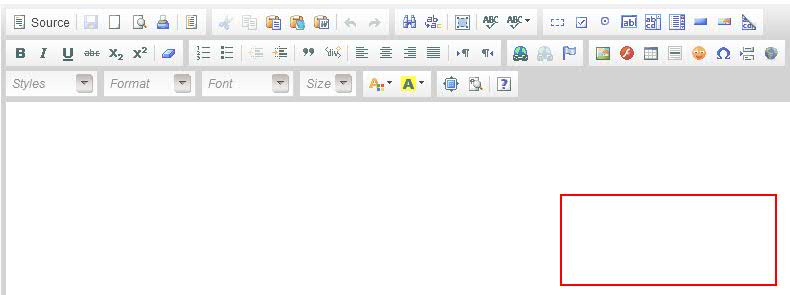
@satya could you tell me where exactly is:
I have tried clicking in many places when CKEditor was in compatibility mode and could not get this result. Are there any other settings or steps that need to be set/taken to reproduce this problem?