
Opened 17 years ago
Closed 17 years ago
#4594 closed Bug (fixed)
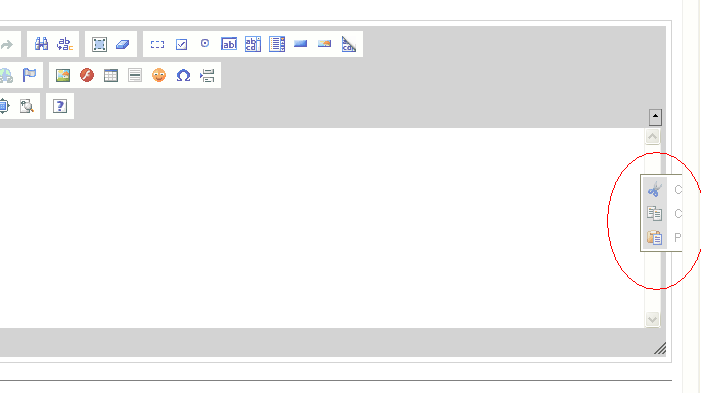
Context menu goes off-screen when mouse is at right had side of screen.
| Reported by: | Joe Kavanagh | Owned by: | Garry Yao |
|---|---|---|---|
| Priority: | Normal | Milestone: | CKEditor 3.1 |
| Component: | General | Version: | 3.0.1 |
| Keywords: | IBM Confirmed Review+ | Cc: | damian.chojna@…, pomu@… |
Description
Create an editor instance that spans the with of the screen. Move the mouse to the right hand side of the editor and right click. Observe the context menu is partially rendered off screen. See attached screen shot. The context menu should be rendered to the left of the mouse.
Scroll bars are rendered so it can be accessed if the user moves to the right.
Attachments (8)
Change History (24)
Changed 17 years ago by
| Attachment: | CKEditor Context Menu.bmp added |
|---|
Changed 17 years ago by
| Attachment: | 4594.patch added |
|---|
comment:1 Changed 17 years ago by
| Cc: | pomu@… added |
|---|
I faced the same problem and I did a workaround with this patch. Tested with IE8, FF3 and Chrome, only in 'ltr' situation.
comment:2 Changed 17 years ago by
| Keywords: | Confirmed HasPatch added |
|---|
Changed 17 years ago by
| Attachment: | 4594_2.patch added |
|---|
comment:3 Changed 17 years ago by
| Keywords: | Review? added; HasPatch removed |
|---|---|
| Owner: | set to Garry Yao |
| Status: | new → assigned |
Implement full off-screen support for context menu inspired by pomu's patch.
Changed 17 years ago by
| Attachment: | 4594_3.patch added |
|---|
comment:4 Changed 17 years ago by
As discussed with Fred, we may even come out a "just work" solution which cascade float panels for off-screen, which is more implementation lightweight than the previous patch.
Ticket Test added at :
http://ckeditor.t/tt/4594/1.html.
comment:5 Changed 17 years ago by
| Keywords: | Review- added; Review? removed |
|---|
It looks like page scrolling impacts on the calculations. In both IE and FF, the panel opens to the top if you scroll down the page and opens the context menu, even if there is room for it at the bottom of the cursor.
Changed 17 years ago by
| Attachment: | 4594_4.patch added |
|---|
comment:7 Changed 17 years ago by
| Keywords: | Review- added; Review? removed |
|---|
After patching, in FF:
- Load a sample.
- Click the color selector.
- With the color selector opened, click any of the combos.
The color selector remains opened. It happens only on first opening, with all combinations of panels opening order, including the context menu.
In IE instead, the panels don't show on first click.
Changed 17 years ago by
| Attachment: | 4594_5.patch added |
|---|
comment:8 Changed 17 years ago by
| Keywords: | Review? added; Review- removed |
|---|
The activation function is been placed at wrong place in previous patch.
comment:9 Changed 17 years ago by
| Keywords: | Review- added; Review? removed |
|---|
No change in IE. The panels are still not showing on first click.
comment:10 Changed 17 years ago by
| Keywords: | Review? added; Review- removed |
|---|
comment:11 Changed 17 years ago by
| Keywords: | Review- added; Review? removed |
|---|
I confirm that in IE8 the panels don't appear on first click.
Changed 17 years ago by
| Attachment: | 4594_6.patch added |
|---|
comment:12 Changed 17 years ago by
| Keywords: | Review? added; Review- removed |
|---|
comment:13 Changed 17 years ago by
| Keywords: | Review+ added; Review? removed |
|---|
comment:15 Changed 17 years ago by
| Resolution: | fixed |
|---|---|
| Status: | closed → reopened |
This solution partially fixes the problem. The sub menu displays over the main menu, making it impossible to navigate around the context menu properly. The sub menu should really display to the side of the main menu.
See attached screenshot: SubmenuOverlap.gif
Changed 17 years ago by
| Attachment: | SubmenuOverlap.gif added |
|---|
comment:16 Changed 17 years ago by
| Resolution: | → fixed |
|---|---|
| Status: | reopened → closed |
The sub menu displays over the main menu...
Please refer to previous comment as our decision for it, feel free to open a new ticket for the feature you're suggesting though.




Off-screen context menu screen shot